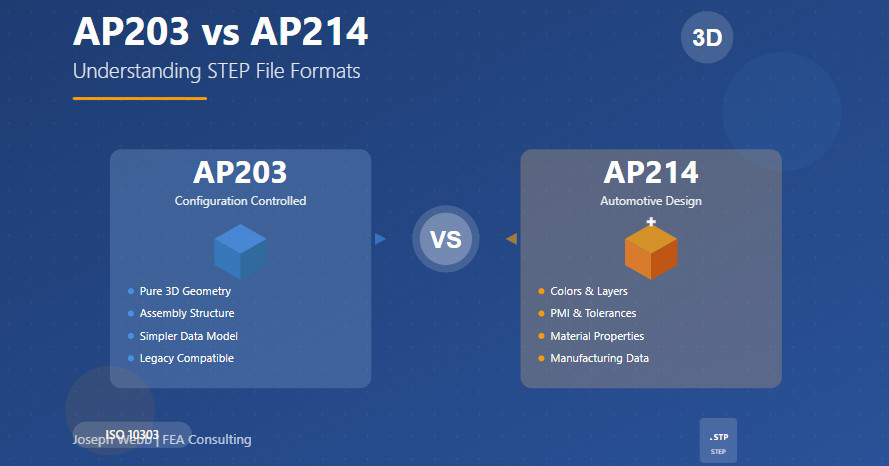
When exchanging 3D CAD data between different software systems, choosing the right STEP file format can make the difference between a seamless transfer and lost information. Both AP203 and AP214 are defined under the STEP (Standard for the Exchange of Product model data) standard, also known as ISO 10303, but they serve different purposes and carry different types of data.
What is STEP?
STEP stands for Standard for the Exchange of Product model data and is formally known as ISO 10303. It's an international standard that provides a vendor-neutral way to share complex 3D geometry and product data across different CAD systems. Within the STEP standard, different Application Protocols (APs) define specific subsets of data that can be exchanged.
Technical Differences
AP203: Designed for pure 3D geometry and assembly structure. It focuses on transferring the shape and configuration of a product. Ideal for systems that do not require visual or manufacturing metadata.
AP214: An extension of AP203 that includes product manufacturing information (PMI) such as:
- Colors and layers
- Material properties
- Tolerances
- Validation properties
- Better support for downstream processes like CAM, visualization, and PLM systems
Understanding AP203: Configuration Controlled 3D Design
AP203, formally titled "Configuration controlled 3D design of mechanical parts and assemblies," focuses on the essential geometric representation of products. When you export a model as AP203, you're capturing the pure geometric essence of your design including solid geometry, surface representations, wireframe elements, and the hierarchical assembly structure.
What AP203 Includes
AP203 preserves the fundamental shape data that forms the foundation of any 3D model. It excels at maintaining geometric fidelity without the complexity of additional product metadata. The format captures:
- 3D solid geometry: Complete representation of part shapes
- Assembly structure: Hierarchical relationships between components
- Surface data: Precise geometric definitions
- Configuration information: Version-controlled geometric definitions
Best Use Cases for AP203
AP203 shines in scenarios where geometric fidelity is paramount but additional product metadata would be unnecessary. Configuration management systems often prefer AP203 because it focuses on version-controlled geometric definitions without the complexity of manufacturing attributes. It's also the better choice when working with older CAD systems or when you need maximum compatibility across diverse software platforms.
Understanding AP214: Automotive Design and Manufacturing
AP214, officially known as "Core data for automotive mechanical design processes," represents a significant expansion beyond AP203's capabilities. While it maintains full backward compatibility with AP203's geometric foundations, it adds a rich layer of product manufacturing information that proves invaluable in modern engineering workflows.
What AP214 Adds
Beyond the geometry that AP203 provides, AP214 includes crucial manufacturing and visual data:
- Visual attributes: Colors, layers, and appearance properties
- Material properties: Physical characteristics needed for analysis and manufacturing
- PMI (Product Manufacturing Information): Dimensions, tolerances, and GD&T
- Validation properties: Quality control and verification data
- Manufacturing metadata: Information for CAM and production processes
Product Manufacturing Information (PMI)
One of AP214's most powerful features is its support for Product Manufacturing Information. PMI encompasses the non-geometric information required to manufacture a part: dimensions, tolerances, surface finish requirements, and annotations. With AP214, PMI can travel with the 3D model itself, enabling Model-Based Definition (MBD) workflows where the 3D model becomes the authoritative source of all product information.
When to Use AP203
Simpler geometry exchange: Best when working with older systems or where configuration control is key and extra data is unnecessary
Ideal for:
- Configuration management systems
- Legacy CAD software
- Pure geometric analysis
- Situations requiring maximum compatibility
- When file size is critical
When to Use AP214
Richer model with visual and product information: Better when workflows include coloring, naming, or manufacturing steps
Ideal for:
- CAM and manufacturing planning
- PLM system integration
- Model-Based Definition workflows
- When visual attributes matter
- Downstream manufacturing processes
Which Should You Use?
Decision Framework
The choice between AP203 and AP214 depends on your specific workflow and what happens to your data after export. Consider these factors:
Choose AP203 when:
- You only need to transfer geometric shape information
- Working with configuration management systems that specifically require it
- The receiving system is older or has limited STEP support
- File size or transfer speed is a critical constraint
- The recipient has explicitly requested AP203
Choose AP214 when:
- Colors, layers, or visual attributes need to be preserved
- Manufacturing information must travel with the geometry
- Files will be used in CAM, inspection, or manufacturing planning
- Integration with modern PLM or PDM systems is required
- You're implementing Model-Based Definition workflows
- You're unsure which format is needed (it's the safer default choice)
Quick Tip: The Safe Default Choice
If your CAD tool allows both exports, choose AP214 unless the receiving system specifically requests AP203.
AP214 retains more visual and metadata integrity during the file exchange process. Systems that only understand AP203-level data will simply ignore the extra information rather than failing to import the file. This makes AP214 the safer default choice for most modern engineering workflows.
Practical Considerations
File Size Differences
Because AP214 files can contain significantly more data than AP203, they tend to be larger. However, the size difference varies dramatically depending on how much additional information is actually included. A simple part with no PMI and basic colors might show negligible size difference, while a complex assembly with extensive annotations could see substantial size increases with AP214.
Compatibility Testing
Before committing to a format for critical projects, test both options with representative models. Import the STEP file back into your CAD system or a neutral viewer to verify that the geometry transferred correctly. For AP214 files, verify that colors, layers, and any PMI you intended to include actually made the journey.
Common Issues and Solutions
One of the most frequent complaints about STEP translation involves missing or corrupted data. Colors disappear, layers get flattened, or annotations vanish. In many cases, these issues stem from using AP203 when AP214 was needed. Even with AP214, check your export settings carefully, as many systems require you to explicitly enable options for including colors, validation properties, or other optional data.
Industry Trends
The broader trend in manufacturing points clearly toward richer data models. Model-Based Enterprise initiatives, digital twins, and integrated PLM systems all demand the kind of comprehensive product information that AP214 can provide. Organizations investing in digital transformation should generally favor AP214 unless specific constraints require otherwise.
While newer protocols like AP242 are emerging that combine and extend capabilities from both AP203 and AP214, these established protocols remain the workhorses of CAD data exchange and will continue to be relevant for many years to come.
Conclusion
Understanding the difference between AP203 and AP214 STEP formats empowers you to make informed decisions about CAD data exchange. AP203 offers elegant simplicity for pure geometric exchange, while AP214 provides the richer information model demanded by modern manufacturing workflows.
For most contemporary engineering applications, AP214 represents the safer default choice. Its additional capabilities ensure that if you need to include colors, materials, or manufacturing information, your workflow can accommodate that data. The format's backward compatibility means systems expecting only geometric data will work fine, while systems capable of leveraging richer information will benefit from its presence.
As engineering continues its digital transformation, the ability to effectively exchange product data across organizational and software boundaries grows ever more critical. By choosing the right STEP format for your specific needs, you ensure that your valuable design data transfers seamlessly through increasingly complex design and manufacturing ecosystems.